
Can ChatGPT make videos? Make Veo 3, Kling and Seedance videos in ChatGPT
ChatGPT can make videos with the Reviral plugin: add Reviral on chatgpt.com/plugins, type @reviral in your message and ask for a Veo 3, Kling and Seedance video. Making videos needs ChatGPT Business, Enterprise or Edu today. A 10-second Seedance 2.5 video costs 204 credits (~$2.54), shown before it starts.
What it costs
- A 10-second Seedance 2.5 video costs 204 credits (~$2.54).
- An 8-second Veo 3.1 Fast video costs 24 credits (~$0.30).
- Pictures from 2 credits (~$0.02) each.
Pay per picture or video with Reviral credits, no subscription needed. The chat shows the exact price before anything is made. See pricing · Create an account
By Wilson Chan Founder, Reviral Last updated
Can ChatGPT make videos?
Yes, with a plugin. ChatGPT plans the video in chat, and the Reviral plugin makes it with a real video model such as Seedance 2.5, Kling V3 or Veo 3.1. You see the price in credits first, say yes, and get the finished video's link in the chat. No Reviral API key is needed.
ChatGPT sees the same 10 tools: list models and prices, get a price, check credits, list my uploads, make a picture, make a video, upscale a video, start a ugc ad, check a job, wait for a job.
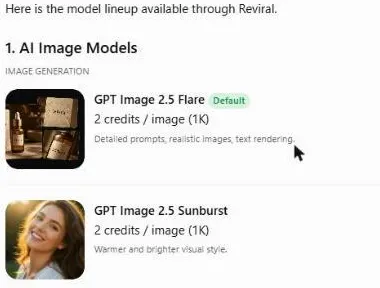
Which ChatGPT plan can use plugins?
ChatGPT Pro can use the read-only tools (prices, models, credits, job status); making pictures and videos from ChatGPT needs ChatGPT Business, Enterprise or Edu (OpenAI, 2026-10). OpenAI says plugin extensions are not available on the ChatGPT Free and Go plans. Source: OpenAI's help pages, read on 30 October 2026; rules can change.
Steps checked October 30, 2026. Sources: OpenAI Help Center: Connecting custom MCP servers in ChatGPT · OpenAI docs: Add custom MCP server
How do I add a custom MCP server to ChatGPT?
On the ChatGPT website open chatgpt.com/plugins, press + and choose Add custom MCP server. Name it Reviral, paste reviral.ai/api/mcp, pick OAuth, tick “I understand and want to continue” and press Create as a plugin. Sign in with Reviral, press Allow, then type @reviral in each message.
Adding a custom MCP server works on the ChatGPT website only, not in the phone app.
Picking the plugin counts for that one message, not the whole chat, so type @reviral each time.
Step 1: Open Plugins
On the web, open chatgpt.com/plugins, press the + button and choose Add custom MCP server.
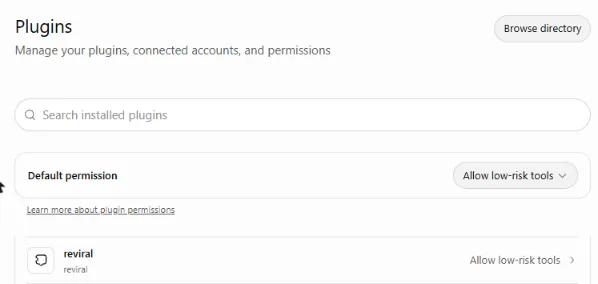
chatgpt.com/plugins: Reviral installed as a plugin. Step 2: Paste the address
Name it Reviral. Under Connection, paste https://reviral.ai/api/mcp as the Server URL.
Step 3: Pick OAuth
For authentication, pick OAuth.
Step 4: Create the plugin
Read the risk warning, tick I understand and want to continue, then press Create as a plugin.
Step 5: Sign in and Allow
A Reviral page opens: sign in with your Reviral account, check that the return address is ChatGPT’s own, then press Allow.
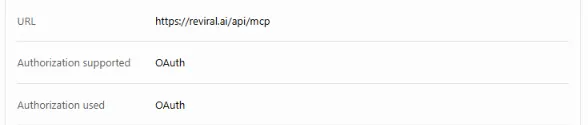
The plugin's address and sign-in: OAuth, no API key. Step 6: Type @reviral
In each message, type @reviral and pick the plugin, then ask, for example “@reviral check my Reviral credits”.
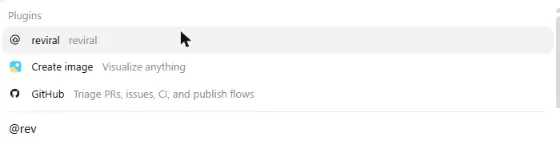
Type @reviral in the message and pick the plugin.
In a ChatGPT workspace, the workspace’s own permissions decide who can add it. To disconnect, revoke “Signed in from an AI chat app” on your API keys page.
Steps checked October 30, 2026. Sources: OpenAI Help Center: Connecting custom MCP servers in ChatGPT · OpenAI docs: Add custom MCP server
Can ChatGPT create a video from a still image?
Yes, from a photo you uploaded on reviral.ai. Upload the picture in Image Studio first, then ask ChatGPT with @reviral to turn your upload into a video. The plugin lists your uploads and sends the one you pick as the reference picture. A photo pasted into the ChatGPT chat itself cannot be sent to Reviral.
Upload on reviral.ai in Image Studio first.
What if ChatGPT says the Reviral connection returned an internal error?
If ChatGPT says the Reviral connection returned an internal error, open Settings → Plugins → reviral, press “…” next to your account and choose Reconnect, then sign in to Reviral again. Still failing? Start a new chat on the website and pick @reviral again in your message.
What does a video cost?
A 10-second Seedance 2.5 video costs 204 credits (~$2.54), a 10-second Kling V3 video 100 credits (~$1.25), and an 8-second Veo 3.1 Fast video 24 credits (~$0.30). ChatGPT shows the exact Reviral price for your length and size first, and nothing is charged before your yes.
Model pages with the live price and a prompt to copy: Seedance, Kling, Veo 3. Prefer Claude? See Reviral in Claude or the Claude image generator.
What can't the chat do yet?
- Upload a photo inside the chat: a photo dropped in the chat cannot be sent to Reviral. Upload it on reviral.ai in Image Studio first, then ask the chat to use it.
- Upscale a video you upload yourself: the chat upscales finished Reviral videos; a video from your computer is upscaled on reviral.ai/app/upscale.
- Bijutsu anime studio (remake a video with your own people, anime style): on reviral.ai/app/bijutsu; the chat gives you the link.
- AI Influencer (a consistent AI person across posts): on reviral.ai/ai-influencer; the chat gives you the link.
- Canvas (a board to plan, make and join pictures and clips): on reviral.ai/app/canvas; the chat gives you the link.
FAQ
- Does it work in the ChatGPT phone app?
- Adding a custom MCP server works on the ChatGPT website only, not in the phone app. Add the plugin on the website first.
- Which ChatGPT is best for video creation?
- For making videos through Reviral, a ChatGPT Business, Enterprise or Edu workspace, because OpenAI allows the tools that make things only there today. On Pro you can still check prices, models, credits and job status.
- Can the chat spend my credits without asking?
- No. The first call only returns the price and your balance and charges nothing. The job starts only when you say yes and the chat calls again with the one-time code, which expires after 10 minutes.
- Do I need an API key?
- Not in claude.ai or ChatGPT: you sign in with your Reviral account. Claude Code, Cursor and Windsurf take an API key you create on reviral.ai.
- ChatGPT says the Reviral connection returned an internal error. What do I do?
- If ChatGPT says the Reviral connection returned an internal error, open Settings → Plugins → reviral, press “…” next to your account and choose Reconnect, then sign in to Reviral again.