
Claude image generator: make Nano Banana Pro and GPT Image pictures in Claude
Claude can make pictures once you add the Reviral connector: ask in plain words and it makes Nano Banana Pro or GPT Image pictures right in the chat. It shows the price first and waits for your yes. Pictures start at 2 credits (~$0.02); a Nano Banana Pro picture costs 10 credits (~$0.12).
What it costs
- Pictures from 2 credits (~$0.02) each.
- A GPT-Image-2.5 Flare picture costs 2 credits (~$0.02).
- A Nano Banana Pro picture costs 10 credits (~$0.12).
Pay per picture or video with Reviral credits, no subscription needed. The chat shows the exact price before anything is made. See pricing · Create an account
By Wilson Chan Founder, Reviral Last updated
Can Claude produce images?
Not by itself: Claude writes and plans, but on its own it does not make photos or artwork. With the Reviral connector it calls Reviral's picture tool, so you get real AI pictures in the chat. It uses GPT-Image-2.5 Flare by default and switches when you name Nano Banana Pro, Seedream, Flux or another model.
How do I add image generation to Claude?
Add Reviral as a custom connector: Customize → Connectors → Add custom connector, name it Reviral, paste reviral.ai/api/mcp, press Continue and then Connect. Sign in with your Reviral account and press Allow. Then ask Claude for a picture; it shows the price first.
Step 1: Open Connectors
In claude.ai open Customize → Connectors → Add custom connector.

Customize → Connectors → + Add → Add custom connector. Step 2: Paste the address
Name it Reviral and paste https://reviral.ai/api/mcp as the server URL. Press Continue, then Connect.
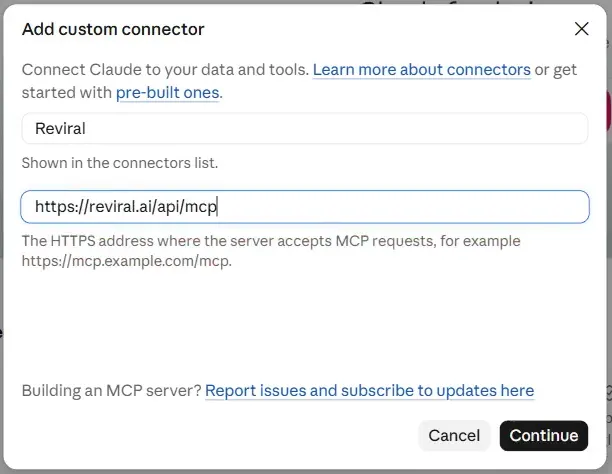
Name it Reviral, paste the address, press Continue. Step 3: Sign in
A Reviral page opens: sign in with your Reviral account, the same login as the website.
Step 4: Allow
Reviral shows who is asking and what it may do. Press Allow. You are back in Claude, connected.
Step 5: Ask
Ask: “what Reviral models do you have?”. A picture or video always shows its price first and waits for your yes.
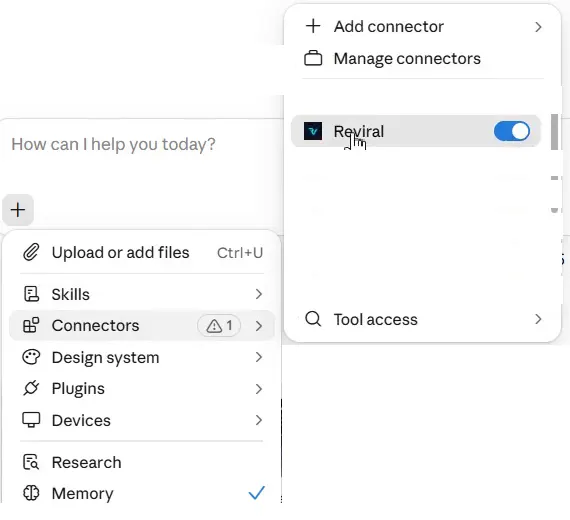
In a chat: + → Connectors shows the Reviral switch, here on.
On a Team or Enterprise plan an Owner adds the connector first; then you press Connect.
Steps checked October 29, 2026. Sources: Claude Help Center: custom connectors · modelcontextprotocol.io: Connect to remote MCP servers
Which image models can Claude use?
Claude sees the live Reviral picture list: GPT-Image-2.5 Flare (the default, clean text in pictures), Nano Banana Pro (top realism, steady people, up to 4K), Seedream, Flux, Midjourney, Qwen Image and more. Ask “which model is best for a product photo?” and Claude lists the matching models with prices.
The Nano Banana Pro page has the live price and a prompt to copy: Nano Banana Pro MCP.
What does a picture cost?
Pictures start at 2 credits (~$0.02) each. A GPT-Image-2.5 Flare picture costs 2 credits (~$0.02) and a Nano Banana Pro picture 10 credits (~$0.12). Bigger sizes can cost more; Claude shows the exact price for your size and shape before it makes anything, and you pay only after your yes.
Can I use my own photo?
Yes, but the photo goes in through reviral.ai, not the chat. Upload it in Image Studio on reviral.ai, then tell Claude “use my photo for a beach poster”. Claude lists your uploads, newest first, and sends the one you mean as the reference picture. A photo dropped into the chat cannot be sent to Reviral.
- On reviral.ai open Image Studio and upload the photo.
- In Claude, say “use my photo” and what you want, for example “use my photo for a beach poster”.
- Claude lists your uploads, newest first, and takes the one you mean, or asks which one.
- You see the price first; nothing is made before your yes.
Want videos too? See the Claude AI video generator, or make pictures from ChatGPT.
What can't the chat do yet?
- Upload a photo inside the chat: a photo dropped in the chat cannot be sent to Reviral. Upload it on reviral.ai in Image Studio first, then ask the chat to use it.
- Upscale a video you upload yourself: the chat upscales finished Reviral videos; a video from your computer is upscaled on reviral.ai/app/upscale.
- Bijutsu anime studio (remake a video with your own people, anime style): on reviral.ai/app/bijutsu; the chat gives you the link.
- AI Influencer (a consistent AI person across posts): on reviral.ai/ai-influencer; the chat gives you the link.
- Canvas (a board to plan, make and join pictures and clips): on reviral.ai/app/canvas; the chat gives you the link.
FAQ
- Can Claude write text inside a picture?
- Yes. Ask for the words you want on the picture; GPT-Image-2.5 Flare is the default because it writes clean text in pictures.
- Can I use Reviral's AI Influencer characters?
- Yes. Ask for one of Reviral's ready-made AI Influencer characters by name; the character's look is added on reviral.ai and the price stays the same.
- Can the chat spend my credits without asking?
- No. The first call only returns the price and your balance and charges nothing. The job starts only when you say yes and the chat calls again with the one-time code, which expires after 10 minutes.
- Do I need an API key?
- Not in claude.ai or ChatGPT: you sign in with your Reviral account. Claude Code, Cursor and Windsurf take an API key you create on reviral.ai.
- ChatGPT says the Reviral connection returned an internal error. What do I do?
- If ChatGPT says the Reviral connection returned an internal error, open Settings → Plugins → reviral, press “…” next to your account and choose Reconnect, then sign in to Reviral again.