
Reviral AI video MCP server: make AI videos and pictures from Claude, ChatGPT and Cursor
The Reviral MCP server is one web address, reviral.ai/api/mcp, that lets Claude, ChatGPT, Cursor and Windsurf make AI videos and pictures for you. You ask in plain words, the chat shows the price in credits, and nothing is made until you say yes. A 10-second Seedance 2.5 video costs 204 credits (~$2.54).
What it costs
- A 10-second Seedance 2.5 video costs 204 credits (~$2.54).
- An 8-second Veo 3.1 Fast video costs 24 credits (~$0.30).
- Pictures from 2 credits (~$0.02) each.
Pay per picture or video with Reviral credits, no subscription needed. The chat shows the exact price before anything is made. See pricing · Create an account
By Wilson Chan Founder, Reviral Last updated
Which chat apps can use Reviral?
claude.ai, ChatGPT, Claude Code, Cursor and Windsurf. In claude.ai and ChatGPT you sign in with your Reviral account, so there is no API key to copy. Claude Code, Cursor and Windsurf take an API key in one line or one file. Each app gets the same 10 tools and the same prices as reviral.ai.
What is an MCP server, in plain words?
An MCP server is a plug for AI chat apps. MCP (Model Context Protocol) is a shared way for a chat app to call outside tools. You add the server's address once, and the chat can then use its tools for you: check a price, make a picture, make a video, or fetch a finished file.
Think of the chat app as a shop assistant and the MCP server as the workshop behind the counter. You tell the assistant what you want; the assistant walks to the workshop, asks the price, comes back to you, and only after your yes does the workshop start. Reviral is the workshop for pictures and videos.
How does it work, step by step?
- Ask in your own words, for example “make me a video of a cat surfing at sunset”. The chat plans the shot and picks a model.
- The chat shows the price in credits, for example “Seedance 2.5 720P VIP · 10 s · 16:9 — yes?”. Nothing is made and nothing is charged until you say yes.
- After your yes the job starts on Reviral. When it is ready, the picture appears in the chat (a video shows its cover picture) with a link that opens the file on reviral.ai.
- Want more? The link opens your project on reviral.ai, where Cinema Studio, Image Studio, Canvas and the other tools pick up from there.
The chat uses GPT-Image-2.5 Flare for pictures and Seedance 2.5 720P VIP for videos unless you name another model. Ask “which model is best for a product ad?” and it lists the matching models with their prices so you can choose.
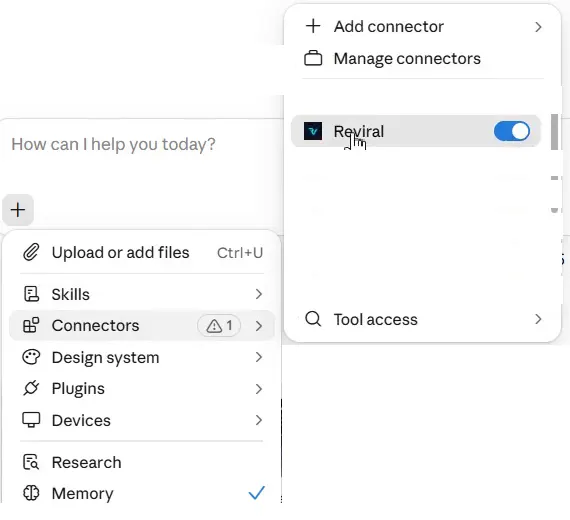
In claude.ai, the Reviral switch for a chat sits under + → Connectors:
What can the 10 Reviral tools do?
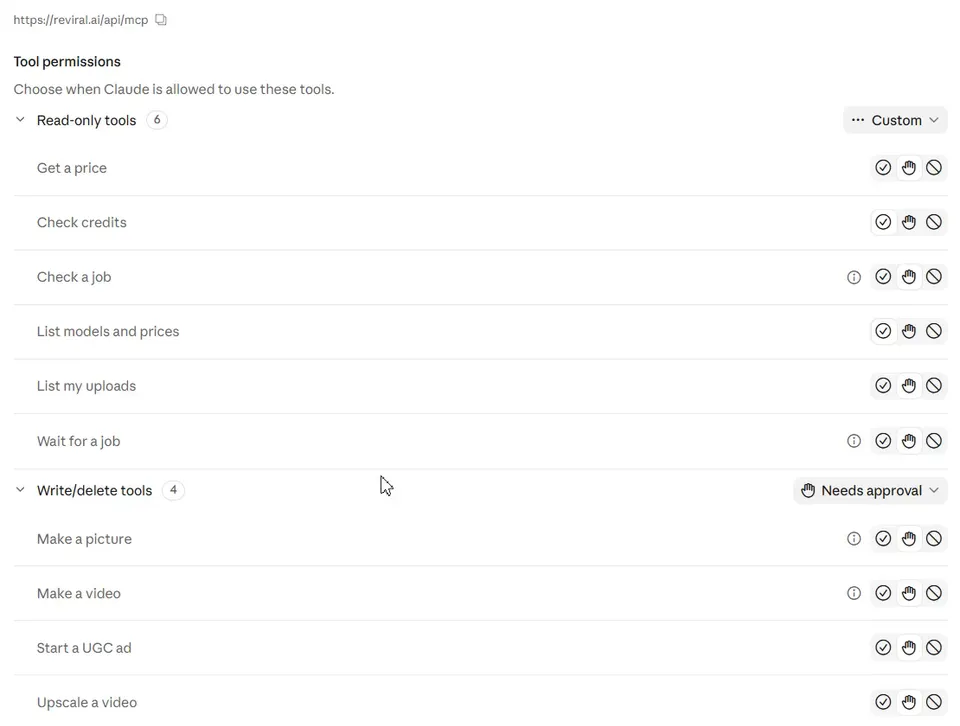
Your chat app picks the tool for you. Six tools only read: models and prices, a price check, your credit balance, your uploads and job status. Four make things: a picture, a video, a sharper 4K copy of a finished video, and a short product ad with a presenter. Those four always show the price first.
| Tool | What it does | Costs credits? |
|---|---|---|
| List models and prices | Lists every image and video model with its price in credits. | No |
| Get a price | Tells you the exact price before you make anything. | No |
| Check credits | Shows your credit balance and plan. | No |
| List my uploads | Lists the photos you uploaded on reviral.ai, so Claude can use one as a reference picture. | No |
| Make a picture | Makes pictures from your words. Shows the price first; runs only after you say yes. | Yes, after you say yes |
| Make a video | Makes a video clip from your words. Shows the price first; runs only after you say yes. | Yes, after you say yes |
| Upscale a video | Makes one of your finished videos sharper, up to 4K, at the Upscale page's prices. Shows the price first; runs only after you say yes. | Yes, after you say yes |
| Start a UGC ad | Makes a short product ad with a ready presenter or your own face. Shows the price first; runs only after you say yes. | Yes, after you say yes |
| Check a job | Shows a job's status and its download link when ready. | No |
| Wait for a job | Waits up to 50 seconds, then returns the job (call again if still running). | No |
What are the Reviral recipes?
Recipes are 7 ready-made starting points that Reviral adds to your chat app. In claude.ai they sit in the + menu under Connectors → Reviral; in Claude Code they are slash commands. Pick one and the chat follows its steps: it asks what is missing, shows the price first and waits for your yes.
- Image Studio: Make pictures from your words, with your own photo if you like.
- Cinema Studio: Make a video clip from your words.
- Image Ads: Make an ad picture of your product from your product photo.
- Bijutsu anime studio: Remake a video with your own people, anime style (on reviral.ai).
- AI Influencer: Pictures of a ready-made AI Influencer character in your scene.
- UGC Ads: A short product ad with a presenter.
- 4K Upscale: Make a video sharper, up to 4K.
What is the difference between an API and an MCP server?
An API is for code: a developer writes requests and handles the answers. An MCP server is for chat apps: the AI reads the tool list and calls the tools for you while you talk in plain words. Reviral has both, with the same models and the same prices, so you can pick either one.
Use the MCP server when you want to make videos and pictures from a chat. Use the Reviral API when you are building an app or a script that makes them automatically.
Developers: the Reviral API docs cover keys, requests and webhooks.
Does ChatGPT use MCP?
Yes. ChatGPT adds MCP servers as plugins: on chatgpt.com/plugins you press +, choose Add custom MCP server, paste the Reviral address, pick OAuth and press Create as a plugin. Then you type @reviral in a message. Which tools work depends on your ChatGPT plan; the ChatGPT page has OpenAI's current rules.
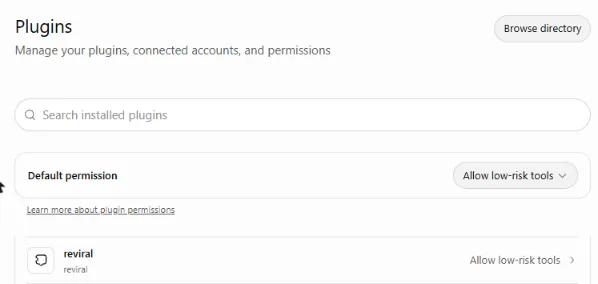
Full steps, plan rules and the fix for the “internal error” message: Reviral in ChatGPT. For claude.ai, open Customize → Connectors → Add custom connector: Reviral in Claude.
Steps checked October 30, 2026. Sources: OpenAI Help Center: Connecting custom MCP servers in ChatGPT · OpenAI docs: Add custom MCP server
Does Cursor work with MCP?
Yes. Cursor and Windsurf read MCP servers from one small settings file. Paste the Reviral block below into that file, put your Reviral API key where it says rvr_YOUR_KEY, and restart the app. Then ask the chat for a picture or a video; it shows the price first and waits for your yes.
Cursor: .cursor/mcp.json in your project or ~/.cursor/mcp.json. Windsurf: ~/.codeium/windsurf/mcp_config.json (Windsurf names the address field serverUrl). Create the key on your API keys page; it starts with rvr_ and you see it once.
{
  "mcpServers": {
    "reviral": {
      "url": "https://reviral.ai/api/mcp",
      "headers": {
        "Authorization": "Bearer rvr_YOUR_KEY"
      }
    }
  }
}
Steps checked October 24, 2026. Sources: Cursor docs: MCP
Which AI models can the MCP server use?
The chat reads Reviral's live model list each time, with one route per model and size and a one-line “best for”. Videos include Seedance, Kling and Veo; pictures include Nano Banana Pro, GPT Image, Seedream and Flux. Each model has its own page below with the live price and a prompt you can copy.
- Seedance MCP →Default video: lifelike, cinematic clips with sound, 4-30 s, 720p.A 10-second video: 204 credits (~$2.54)
- Nano Banana Pro MCP →Nano Banana Pro: top realism and consistent people, up to 4K.A picture: 10 credits (~$0.12)
- Kling MCP →Kling V3: smooth, realistic motion, 3-15 s, up to 1080p.A 10-second video: 100 credits (~$1.25)
- Veo 3 MCP →Veo 3.1 Fast: realistic 8 s clips with sound, up to 4K.A 8-second video: 24 credits (~$0.30)
How does price-first work?
The first call for a picture or video only returns the price, your balance and a one-time yes-code; nothing is charged. The job starts only when the chat calls again with that code, which it does after your yes. The code works once and expires after 10 minutes, and a changed request needs a new price.
Not enough credits? The chat tells you how many more you need and links to top up. A long video keeps running on Reviral; the chat checks back every 50 seconds and brings the link when it is ready.
What can't the chat do yet?
- Upload a photo inside the chat: a photo dropped in the chat cannot be sent to Reviral. Upload it on reviral.ai in Image Studio first, then ask the chat to use it.
- Upscale a video you upload yourself: the chat upscales finished Reviral videos; a video from your computer is upscaled on reviral.ai/app/upscale.
- Bijutsu anime studio (remake a video with your own people, anime style): on reviral.ai/app/bijutsu; the chat gives you the link.
- AI Influencer (a consistent AI person across posts): on reviral.ai/ai-influencer; the chat gives you the link.
- Canvas (a board to plan, make and join pictures and clips): on reviral.ai/app/canvas; the chat gives you the link.
FAQ
- Which chat apps work with the Reviral MCP server?
- claude.ai (web, desktop and phone), Claude Code, ChatGPT, Cursor and Windsurf. claude.ai and ChatGPT sign in with your Reviral account; the others take an API key in one line or one file.
- Which models can I use?
- The chat sees a short list with one route per model and size: videos such as Veo 3, Kling and Seedance, pictures such as Nano Banana Pro and GPT Image. It uses GPT-Image-2.5 Flare for pictures and Seedance 2.5 720P VIP for videos unless you name another model.
- How much does it cost?
- You pay per picture or video with Reviral credits, at the same prices as the website. A 10-second Seedance 2.5 video costs 204 credits (~$2.54); pictures start at 2 credits (~$0.02). Credit packs need no subscription.
- Can the chat spend my credits without asking?
- No. The first call only returns the price and your balance and charges nothing. The job starts only when you say yes and the chat calls again with the one-time code, which expires after 10 minutes.
- Do I need an API key?
- Not in claude.ai or ChatGPT: you sign in with your Reviral account. Claude Code, Cursor and Windsurf take an API key you create on reviral.ai.
- ChatGPT says the Reviral connection returned an internal error. What do I do?
- If ChatGPT says the Reviral connection returned an internal error, open Settings → Plugins → reviral, press “…” next to your account and choose Reconnect, then sign in to Reviral again.
- Can I use my own photo?
- Yes. Upload it on reviral.ai in Image Studio, then tell the chat “use my photo”. The chat lists your uploads and sends the one you pick as the reference picture. A photo dropped into the chat itself cannot be sent to Reviral.
Technical reference
The address is https://reviral.ai/api/mcp. Tool fields, limits, the Claude Code one-line command and every recipe name are on the MCP technical reference. Machine-readable files for AI assistants: llms.txt and pricing.md.