
Seedance MCP: make Seedance 2.5 videos in Claude and ChatGPT
Seedance MCP means making Seedance 2.5 videos from your AI chat through an MCP server. Add the Reviral connector to Claude or ChatGPT, ask for a Seedance video, see the price, say yes. A 10-second Seedance 2.5 video costs 204 credits (~$2.54), paid with Reviral credits, no subscription needed.
What it costs
- A 10-second Seedance 2.5 video costs 204 credits (~$2.54).
- Pictures from 2 credits (~$0.02) each.
Pay per picture or video with Reviral credits, no subscription needed. The chat shows the exact price before anything is made. See pricing · Create an account
By Wilson Chan Founder, Reviral Last updated
What is Seedance MCP?
Seedance MCP is a way to use Seedance 2.5 from Claude, ChatGPT, Cursor or Windsurf instead of a separate website. The Reviral MCP server gives your chat app a price tool and a make-video tool for Seedance 2.5, plus 8 more tools, all under one sign-in and one credit balance.
What Seedance is good at: Lifelike, cinematic clips with sound, 4-30 s, 720p.
How do I make a Seedance video from Claude or ChatGPT?
Add Reviral once (claude.ai: Customize → Connectors → Add custom connector; ChatGPT: chatgpt.com/plugins → Add custom MCP server), sign in, then ask: “make a Seedance video of …”. The chat checks the price, asks you, and after your yes the video appears with a reviral.ai link.
In claude.ai
Step 1: Open Connectors
In claude.ai open Customize → Connectors → Add custom connector.
Step 2: Paste the address
Name it Reviral and paste https://reviral.ai/api/mcp as the server URL. Press Continue, then Connect.
Step 3: Sign in
A Reviral page opens: sign in with your Reviral account, the same login as the website.
Step 4: Allow
Reviral shows who is asking and what it may do. Press Allow. You are back in Claude, connected.
Step 5: Ask
Ask: “what Reviral models do you have?”. A picture or video always shows its price first and waits for your yes.
In ChatGPT
Step 1: Open Plugins
On the web, open chatgpt.com/plugins, press the + button and choose Add custom MCP server.
Step 2: Paste the address
Name it Reviral. Under Connection, paste https://reviral.ai/api/mcp as the Server URL.
Step 3: Pick OAuth
For authentication, pick OAuth.
Step 4: Create the plugin
Read the risk warning, tick I understand and want to continue, then press Create as a plugin.
Step 5: Sign in and Allow
A Reviral page opens: sign in with your Reviral account, check that the return address is ChatGPT’s own, then press Allow.
Step 6: Type @reviral
In each message, type @reviral and pick the plugin, then ask, for example “@reviral check my Reviral credits”.
ChatGPT Pro can use the read-only tools (prices, models, credits, job status); making pictures and videos from ChatGPT needs ChatGPT Business, Enterprise or Edu (OpenAI, 2026-10).
A Seedance prompt you can copy
Make a 10-second Seedance video, 16:9: a barista pours latte art in a sunny café, slow push-in, soft morning light.
Paste it into the chat after you connect Reviral. The chat asks for anything missing, shows the price, and makes the video after your yes.
Steps checked October 30, 2026. Sources: Claude Help Center: custom connectors · modelcontextprotocol.io: Connect to remote MCP servers · OpenAI Help Center: Connecting custom MCP servers in ChatGPT · OpenAI docs: Add custom MCP server
What does a Seedance video cost?
A 10-second Seedance 2.5 video costs 204 credits (~$2.54) on Reviral, the same price as on the website and in the API. Other lengths, sizes and shapes change the price; the chat always shows the exact number before anything starts, and you pay nothing if you say no.
| Model and length or size | Credits | About |
|---|---|---|
| Seedance 2.5 720P VIP · 5 s · 720p | 102 | $1.27 |
| Seedance 2.5 720P VIP · 10 s · 720p | 204 | $2.54 |
| Seedance 2.5 720P VIP · 15 s · 720p | 306 | $3.82 |
Live prices, read from the same price list the studio charges from; dollars at the Mini Pack rate. All prices: Reviral pricing.
Which Seedance version is live?
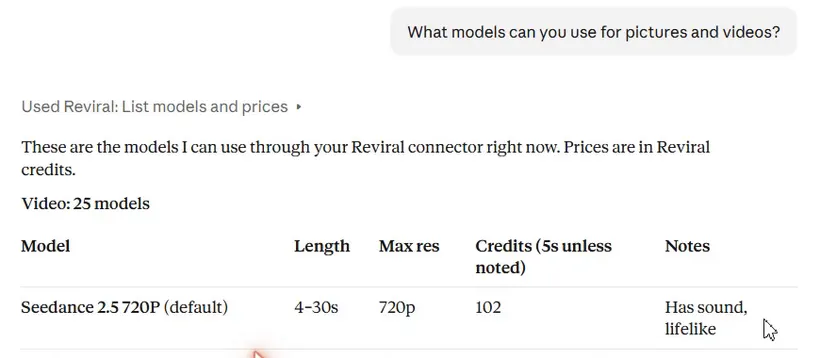
The live route is Seedance 2.5 720P VIP. Lifelike, cinematic clips with sound, 4-30 s, 720p. The chat reads the live list every time it runs, so when a newer Seedance version goes live on Reviral, your chat app sees it without any change on your side.
What can't the chat do yet?
- Upload a photo inside the chat: a photo dropped in the chat cannot be sent to Reviral. Upload it on reviral.ai in Image Studio first, then ask the chat to use it.
- Upscale a video you upload yourself: the chat upscales finished Reviral videos; a video from your computer is upscaled on reviral.ai/app/upscale.
- Bijutsu anime studio (remake a video with your own people, anime style): on reviral.ai/app/bijutsu; the chat gives you the link.
- AI Influencer (a consistent AI person across posts): on reviral.ai/ai-influencer; the chat gives you the link.
- Canvas (a board to plan, make and join pictures and clips): on reviral.ai/app/canvas; the chat gives you the link.
FAQ
- Can I pick Seedance by name?
- Yes. Say “use Seedance” in your message; the chat uses Seedance 2.5 720P VIP only when you do not name a model.
- Can the chat spend my credits without asking?
- No. The first call only returns the price and your balance and charges nothing. The job starts only when you say yes and the chat calls again with the one-time code, which expires after 10 minutes.
- Do I need an API key?
- Not in claude.ai or ChatGPT: you sign in with your Reviral account. Claude Code, Cursor and Windsurf take an API key you create on reviral.ai.
- ChatGPT says the Reviral connection returned an internal error. What do I do?
- If ChatGPT says the Reviral connection returned an internal error, open Settings → Plugins → reviral, press “…” next to your account and choose Reconnect, then sign in to Reviral again.