GPT Image 2.5 Prompt Guide with Tested Examples
The GPT Image 2.5 prompts that worked best for us name the job first, then fill five labelled parts: scene, subject, details with the exact words in quotes, use case and limits. All five tests below spelled every word and number right. Each picture cost 2 credits on Reviral, about $0.02, at 1K (checked 24 September 2026). Pay by card, or in ringgit (RM) with Touch 'n Go eWallet for credit packs or Visa/Mastercard for monthly plans.
- 5
- tested prompts
- 28/28
- text items spelled right
- 2
- credits per picture
- 48–58 s
- wait per picture, our clock
The formula
The GPT Image 2.5 Prompt Formula We Used
Start with the job in one line, such as "Design a screen-printed gig poster for a jazz night." Then write five labelled parts in the same order every time: Scene, Subject, Important Details, Use Case and Constraints. Labels give each fact one home, so the look, the words and the limits never blur together.
Put every word that must appear inside quotes and say where it goes and how it looks: title across the top in heavy condensed sans-serif, orange, "BLUE HOUR SESSIONS". End with a Constraints line saying the picture carries only those words. Across our five tests that gave 28 correct text items out of 28: titles, labels, prices, times and distances.
Describe light as a cause with an effect. "A warm bulb above the mirror lights the tube from the upper left, giving a soft sheen along the matte tube" tells the model where the highlight and the shadow belong, which is what makes a product picture look photographed.
Give colours as hex codes when they matter (#1B2A4A navy, #D9622B orange). The poster came back in exactly those two inks, with the slight out-of-register gap we asked for.
Written and tested by the Reviral team on 24 September 2026. Every picture on this page was made on Reviral that day with the exact prompt printed next to it, one try each, nothing retouched. Prices read from Reviral's public model list and credit-cost list the same day.
Real outputs, exact prompts
5 Tested GPT Image 2.5 Prompts and What They Made
Each prompt is printed exactly as we sent it to GPT Image 2.5 (standard tier), next to the picture it made on the first try. Pictures are shown reduced to at most 1,600 px on the long side. Copy a prompt, change the words in quotes, and run it.
- 01
Poster with exact text (3:4)
Prompt (exact, 2 credits, ready in 57 s): Design a screen-printed gig poster for a jazz night. Scene: a flat poster on warm off-white paper, printed with only two inks, deep navy #1B2A4A and burnt orange #D9622B; the orange layer sits slightly out of register, so a thin line of bare paper shows along one edge of each orange shape. Subject: a saxophonist drawn in bold flat shapes, seen from the side, leaning back mid-note, the bell of the horn pointing up toward the top-right corner; a crescent moon cut out of the navy sky above him. Important Details: title across the top in heavy condensed sans-serif, orange: "BLUE HOUR SESSIONS". Under the figure, navy small caps: "LIVE JAZZ · EVERY FRIDAY · 9 PM". Bottom line, smaller navy caps: "UPSTAIRS AT NO. 12". The ink shows the light speckle and uneven density of a hand-pulled screen print, and paper fibres show through where the ink is thin. Use Case: gig poster printed at A2 and pasted on a wall outside a small music bar. Constraints: only these three text lines, spelled exactly as written; no extra words, no duplicate text, no other logos, no watermark.
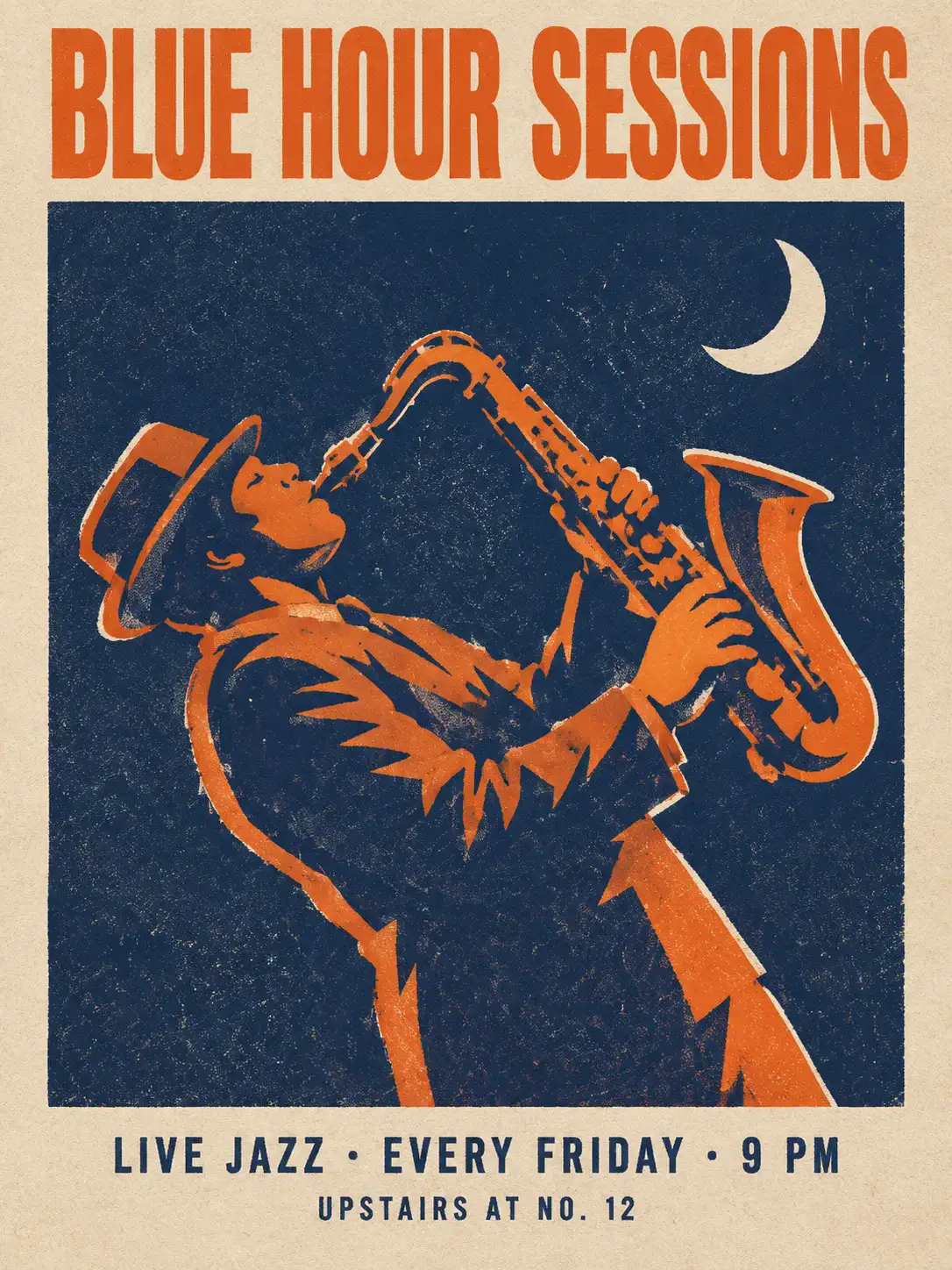
What to notice: all three text lines are spelled right, only two inks are used, and a thin line of bare paper shows along the orange shapes, just as the prompt asked. - 02
App screen with exact numbers (9:16)
Prompt (exact, 2 credits, ready in 52 s): Create a shipped app screenshot of a running app's run-summary screen. Scene: one phone screen filling the frame edge to edge, shown flat, light mode, white background. Subject: the summary screen shown right after a morning run. Important Details: top bar with a back arrow and the title "Morning Run"; under it a small grey line "Tue · 6:42 AM · Lakeside Park". A rounded map card shows an orange route line #FF5A1F looping around a small lake, with one green dot where the run starts and ends. Below it, a 2 x 2 grid of stat tiles, each with a large bold number and a small grey label: "5.02 km" Distance, "27:48" Time, "5:32 /km" Avg pace, "312" Calories. Under the tiles, a small bar chart titled "Pace per km" with five orange bars labelled 1 to 5. A full-width orange button at the bottom reads "Share run". Clean sans-serif type, 16 px side margins, even spacing between cards. Use Case: product screenshot for an app store listing. Constraints: every number and label exactly as written and readable; no placeholder text, no lorem ipsum, no app logo, no watermark.
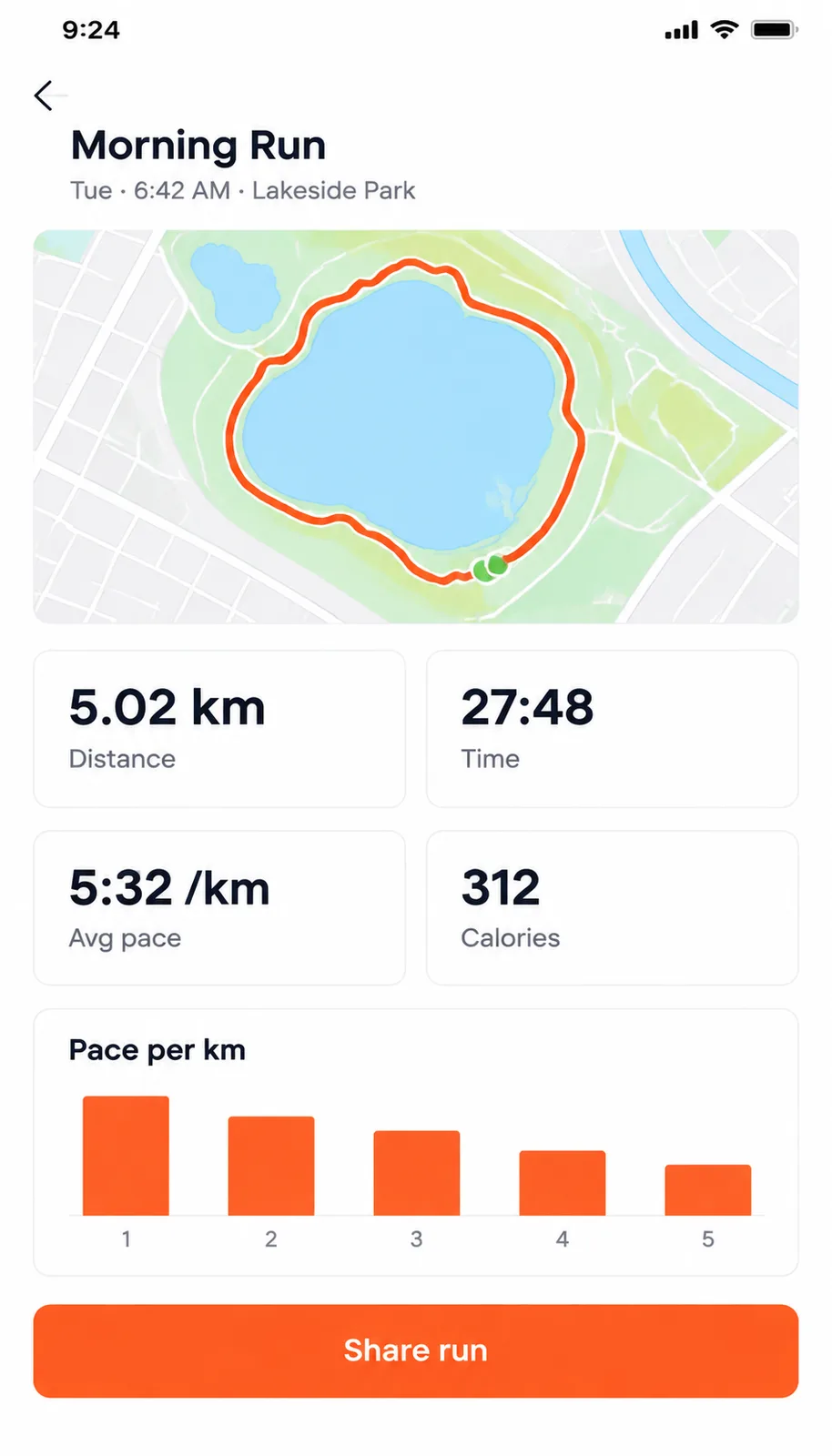
What to notice: every number and label is right (5.02 km, 27:48, 5:32 /km, 312). It also added a phone status bar with a clock and battery that the prompt did not ask for. - 03
Infographic timeline (3:4)
Prompt (exact, 2 credits, ready in 58 s): Create an educational infographic for home bakers. Title: "Sourdough starter: day 1 to day 5" across the top in dark brown #3B2A1A serif type. Content flow: five rows from top to bottom joined by one thin vertical brown line, each row a small numbered circle, a realistic glass jar on the left and one short line on the right: 1 "Mix 50 g flour + 50 g water" — a jar with a flat beige paste; 2 "A few bubbles appear" — the same jar with small bubbles at the top; 3 "Rises and smells sour" — the paste higher, bubbles through it; 4 "Discard half, feed again" — the jar half full and freshly stirred; 5 "Doubles in 6 hours: ready to bake" — the starter domed and bubbly, twice the height of a rubber band stretched around the jar at its starting level. Visual format: vertical timeline on a cream background #F5EEDC, wide margins; soft light from the upper left gives each glass jar one small highlight and a faint shadow to its right. Use Case: infographic for a recipe blog, read on a phone. Constraints: every word and number spelled exactly as written and readable; no extra text, no logos, no watermark.
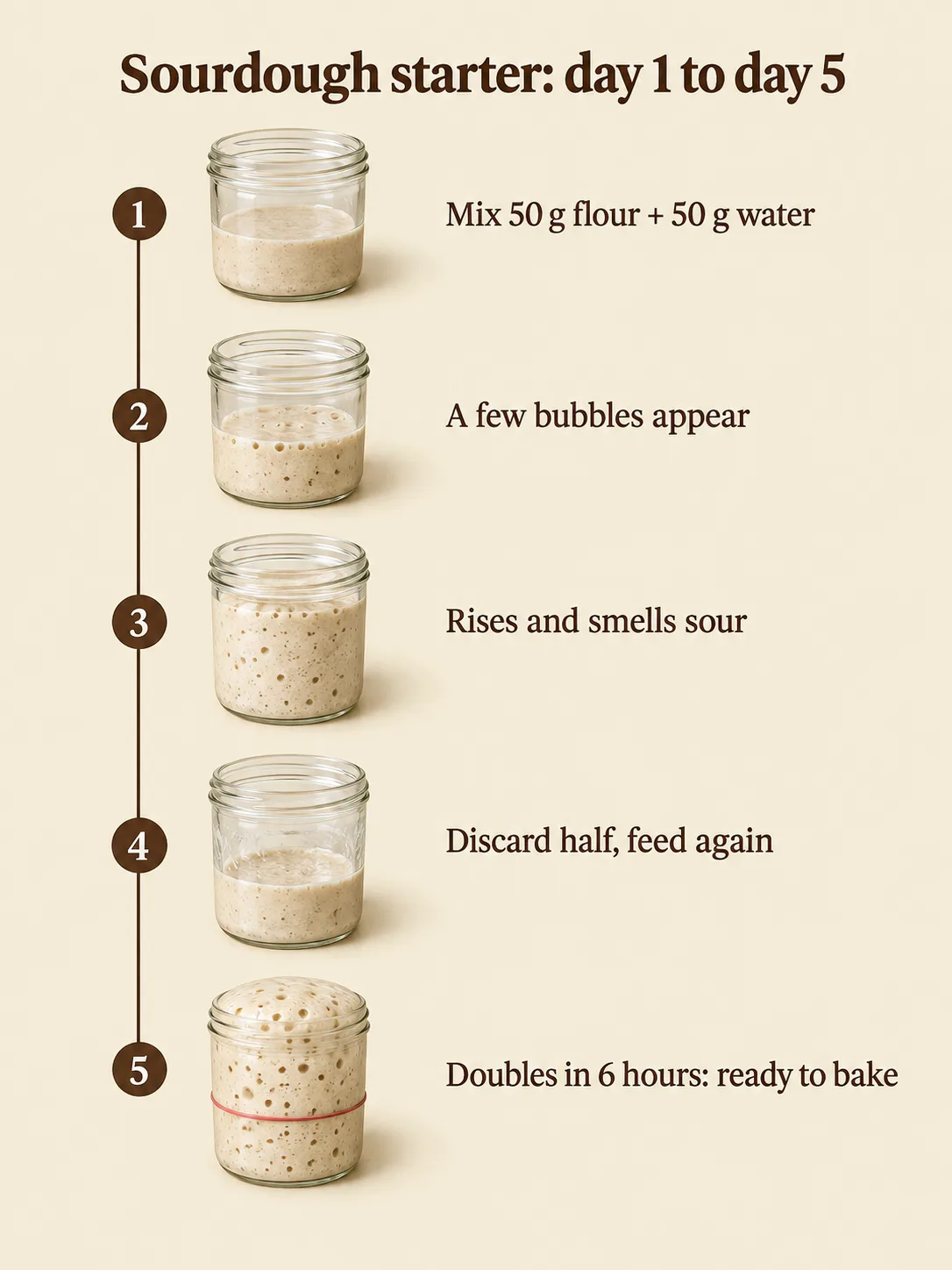
What to notice: the title and all five lines are spelled right, the jars fill up step by step, and the rubber band on the last jar shows the starter has doubled. - 04
Product photo with a printed label (4:5)
Prompt (exact, 2 credits, ready in 53 s): Create a product photo of a hand-cream tube on a bathroom sink. Scene: the edge of a white ceramic bathroom sink in the evening; a small round mirror and pale green square tiles behind, out of focus. Subject: one 75 ml squeeze tube of hand cream in matte sage green, crimped flat at the top and standing on its white screw cap on the sink edge; the label is printed in white: "KIVELLE" in thin wide-spaced capitals and under it "Hand Cream · Oat & Pear · 75 ml". A pea-sized dab of cream sits on the sink edge beside the tube. Important Details: a warm bulb above the mirror lights the tube from the upper left, giving a soft sheen along the matte tube and a glossy peak on the dab of cream; the tube throws a short soft shadow to the right; a few water drops on the sink from the tap catch small bright highlights. Camera at sink height, tube on the right third, label facing the camera. Use Case: product photo for an online shop and a social ad. Constraints: label text exactly as written; no other text or logos; no people; no watermark.
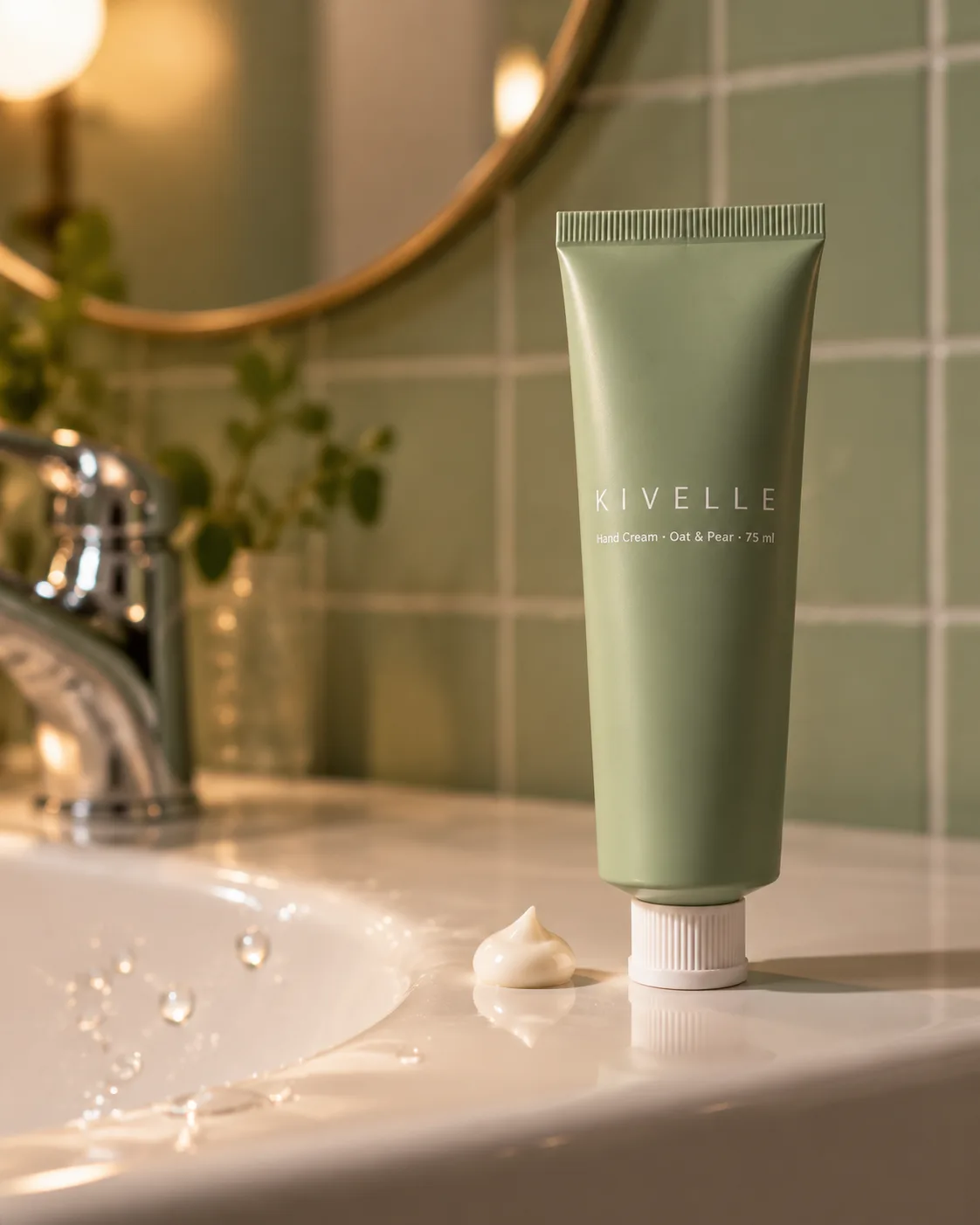
What to notice: the label reads exactly "KIVELLE" and "Hand Cream · Oat & Pear · 75 ml", the tube stands on its cap, and the dab of cream has a glossy peak from the bulb. - 05
Editorial photo of a person (3:2)
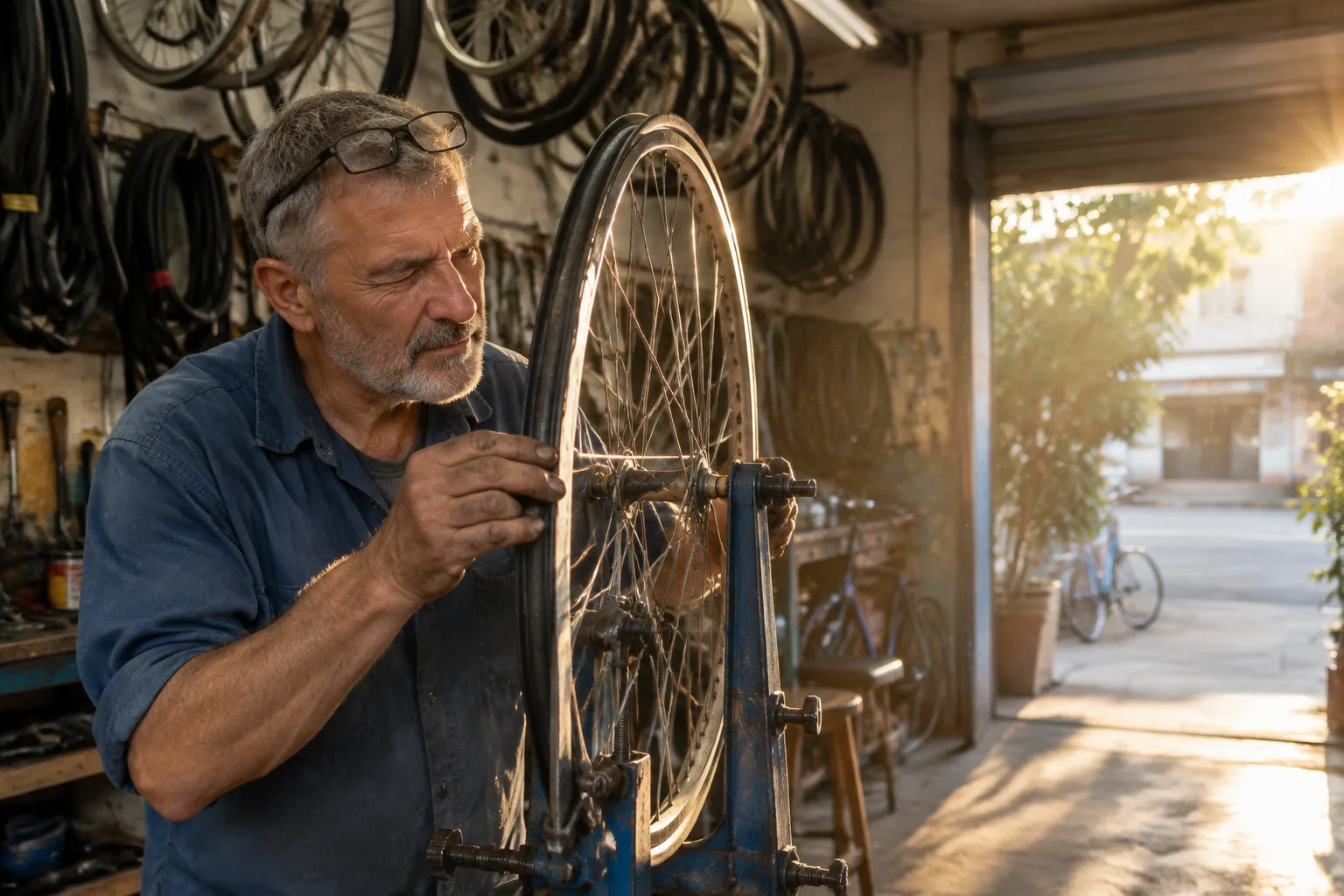
Prompt (exact, 2 credits, ready in 48 s): Create an editorial photograph inside a bicycle repair shop. Scene: a narrow bicycle repair shop in an old shophouse in the late afternoon; wheels and inner tubes hang from hooks on the walls; the roll-up front door is open to the street. Subject: a man in his sixties with grey stubble and reading glasses pushed up on his forehead, in a faded blue work shirt with rolled sleeves, truing a spoked wheel on a repair stand, one eye closed as he sights along the rim. Important Details: low sun comes through the open door behind him on the right, putting a warm rim of light on his shoulder and along the spokes while the inside of the shop stays in soft shade; dust drifts in the sunbeam; grease on his fingertips, worn paint on the stand. Camera at his chest height a few steps away, him on the left third. Use Case: editorial photograph for a magazine feature; looks like a real photo. Constraints: no glamorisation, no heavy retouching; no signage or text anywhere; no watermark.
What to notice: the glasses on his forehead, grease on his fingers and sunlit spokes all match. Two details drifted: his eye reads as a squint rather than closed, and the sun lights his face more than a rim on his shoulder.
Live settings
GPT Image 2.5 Settings on Reviral
Read from Reviral's public model list on 24 September 2026; the studio shows the same limits.
| Setting | GPT Image 2.5 | What it means for your prompt |
|---|---|---|
| Picture size | 1K only | Plan for web and social use; for 2K–4K files use Nano Banana Pro or Seedream 5.0 |
| Shapes | 11: 1:1, 5:4, 4:5, 4:3, 3:4, 16:9, 9:16, 3:2, 2:3, 21:9, 9:21 | Pick the shape in the studio, then write the layout for that shape |
| Reference pictures | Up to 9 | Add your product or logo instead of describing it |
| Tiers | Standard, Flare, Sunburst | The same prompt works on all three |
| Credits | 2 per picture on every tier | About $0.02 each |
| API id | gpt-image-2.5 | The same model through the Reviral API |
Checked 24 September 2026 on reviral.ai/api/v1/models.
Honest limits
Where GPT Image 2.5 Went Off-Prompt
Small extras can appear: the app screen got a status bar we never asked for. If a detail must not be there, say so in the Constraints line, then check the result.
People and light are looser than text. The mechanic's closed eye became a squint and the rim light fell on his face instead. Words and layout were followed more exactly than body details.
GPT Image 2.5 on Reviral makes 1K pictures only, and these tests used no reference pictures, so they say nothing about how closely it copies an uploaded product.
Price shown before you generate
How Much Do These GPT Image 2.5 Prompts Cost?
Every GPT Image 2.5 tier costs 2 credits per 1K picture on Reviral, about $0.02 at the $4.99 Mini Pack rate, checked 24 September 2026. If a picture cannot be finished, the credits go back automatically.
GPT Image 2.5 · live price · 1K
Credits first, dollars at the $4.99 Mini Pack rate · checked 24 September 2026
| What you make | Credits | Price |
|---|---|---|
| 1 picture, any GPT Image 2.5 tier | 2 credits | $0.02 |
| All 5 examples on this page | 10 credits | $0.12 |
| One prompt on standard, Flare and Sunburst | 6 credits | $0.07 |
| Mini Pack, one-time, never expires | 400 credits | $4.99 = 200 pictures |
Sign-up gives 100 free credits with no card, enough for 50 GPT Image 2.5 pictures. Dollars use the $4.99 Mini Pack rate ($0.012475 per credit), checked 24 September 2026. Pay by card, or in ringgit (RM) with Touch 'n Go eWallet for credit packs or Visa/Mastercard for monthly plans.
Keep going
More Prompts, Models and Tests
GPT Image 2.5 on Reviral
The three tiers (standard, Flare, Sunburst), all 2 credits a picture.
APIGPT Image 2.5 API
The same model through one API key: fields and limits.
HOWProduct photo tutorial
Step by step with GPT Image 2.5 Sunburst and a product photo.
VSGPT Image 2.5 vs Nano Banana Pro
One chalkboard-menu prompt on both models.
VSGPT Image 2.5 vs Seedream 5
One product-can prompt by a sunny pool.
VIDSeedance 2.5 prompt guide
Prompts for video instead of pictures.
Short answers
GPT Image 2.5 Prompt FAQ
What is the best prompt structure for GPT Image 2.5?+
State the job in one line, then write Scene, Subject, Important Details, Use Case and Constraints, with every word that must appear in quotes. All five tests on this page used it.
Can GPT Image 2.5 spell text inside pictures?+
In our five tests on 24 September 2026 it spelled 28 of 28 text items right, including prices, times and distances. Still zoom in on every word before you publish.
How much does one GPT Image 2.5 picture cost on Reviral?+
2 credits per 1K picture on every tier, about $0.02 at the $4.99 Mini Pack rate (checked 24 September 2026).
What size does GPT Image 2.5 make?+
1K only on Reviral, in 11 shapes from 1:1 to 21:9 and 9:21. For 2K to 4K pictures use Nano Banana Pro or Seedream 5.0.
Do I write prompts differently for Flare or Sunburst?+
No. The same prompt runs on all three tiers for 2 credits; the five examples here used the standard tier.
How long does one GPT Image 2.5 picture take?+
Between 48 and 58 seconds for each of our five pictures on 24 September 2026.
2 credits a picture · 100 free credits at sign-up, no card
Run a GPT Image 2.5 Prompt of Your Own
Open the studio with GPT Image 2.5 picked and a poster prompt filled in. Change the words in quotes and press Generate: each picture costs 2 credits (about $0.02), checked 24 September 2026. Pay by card, or in ringgit (RM) with Touch 'n Go eWallet for credit packs or Visa/Mastercard for monthly plans.
Make a picture with GPT Image 2.5Last updated: September 24, 2026