GPT Image 2.5 vs Seedream 5, Tested Side by Side
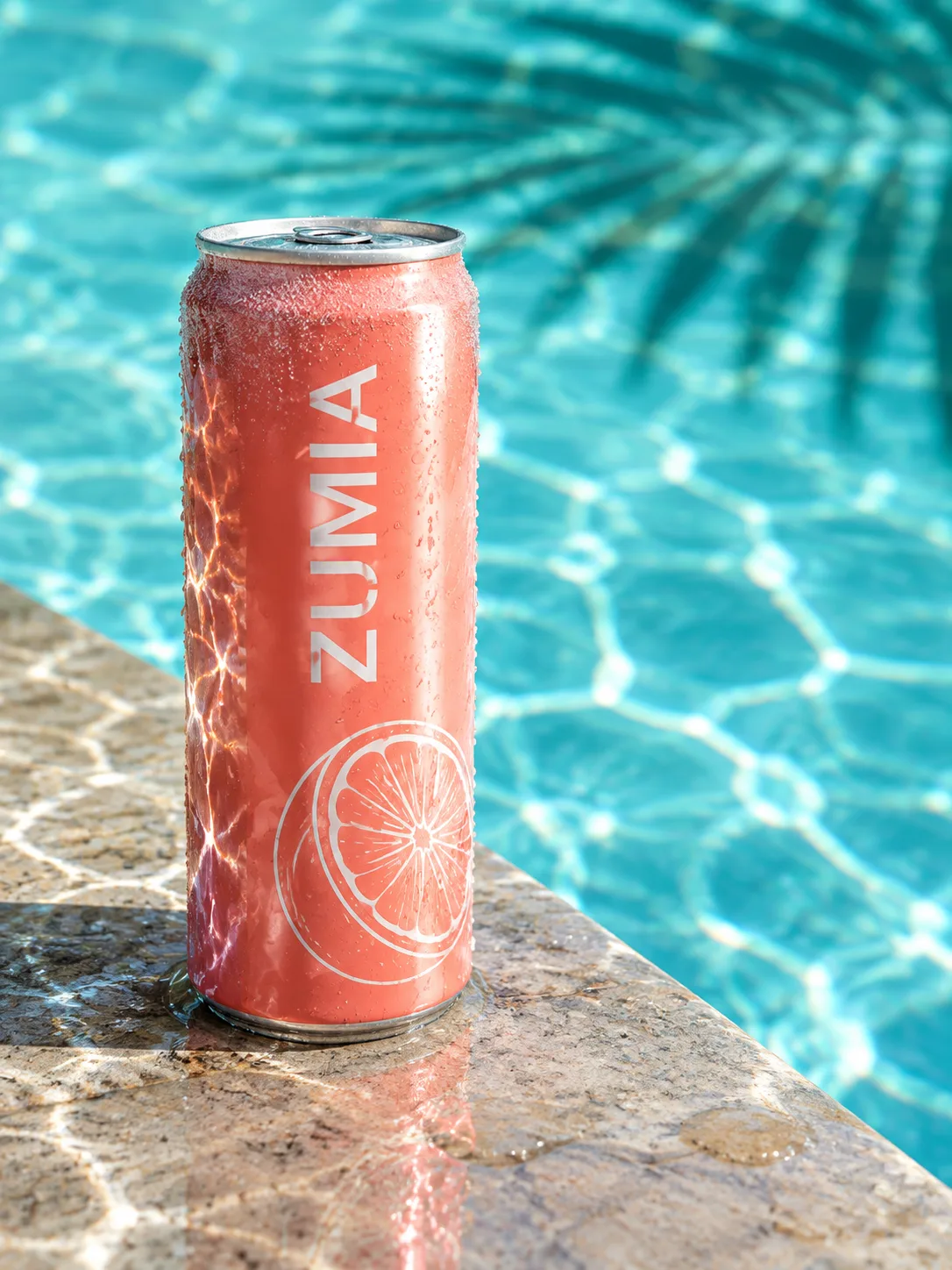
On the same product-can scene, GPT Image 2.5 printed only the word ZUMIA and threw rippling pool light across the can. Seedream 5.0 first added a garbled volume line; with one extra "no small print" line it printed only ZUMIA too, with a bigger splash. GPT Image 2.5 cost 2 credits at 1K; Seedream 5.0 cost 6 at 2K, checked 24 September 2026. Pay by card, or in ringgit (RM) with Touch 'n Go eWallet for credit packs or Visa/Mastercard for monthly plans.
- 0 vs 1
- extra prompt lines needed
- 2 vs 6
- credits per picture
- 1K vs 2K
- picture size made
- 45 s vs 43 s
- wait, our clock
Real outputs, one try each
One Scene: GPT Image 2.5 and Seedream 5
One scene, the same 3:4 shape, one picture shown per model, made on 24 September 2026. Seedream's prompt had one extra no-small-print line (see below). ZUMIA is a brand we invented for tests. Shown reduced; the sizes made are in the table below.
GPT Image 2.5 · 2 credits · 1K
Slim can as asked; rippling pool light across its left side; ZUMIA and the grapefruit drawing are the only print.
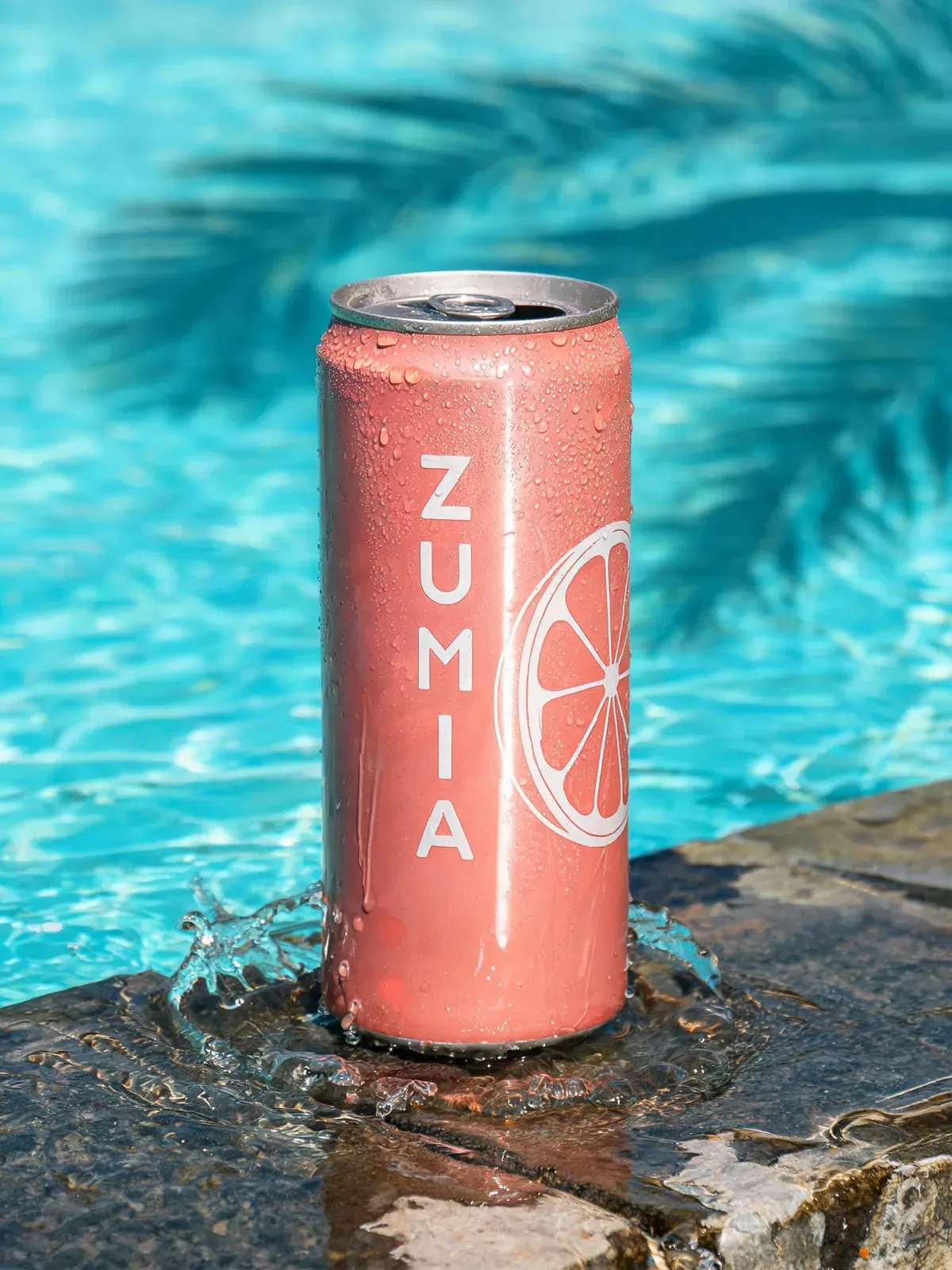
Seedream 5.0 · 6 credits · 2K · second run
Only ZUMIA and the drawing, after the extra no-small-print line; big splash; the top looks opened; weaker light ripples on the can.
Copy it
The Prompts We Used, and the One Difference
GPT Image 2.5 got this prompt, word for word: "Create a product photo: one slim 355 ml can of ZUMIA grapefruit sparkling water: coral-pink aluminium with a white line drawing of a grapefruit slice and the word "ZUMIA" printed vertically in white, stands on the wet stone edge of a swimming pool at midday. Water splashed from the pool pools around its base and beads on its sides, and cold condensation frosts its upper half. Hard midday sun from high on the right puts one sharp highlight stripe down the can, and sunlight bouncing off the moving pool water throws rippling light lines onto its left side. Behind, the pool water is turquoise and out of focus, with the rippled shadow of a palm leaf across it. Low camera at can height, the can slightly left of centre with its label facing the camera. The can carries only its printed word and drawing, and the rest of the picture has no added text or watermark."
Seedream 5.0 got this one: "Create a product photo: one slim tall can of ZUMIA grapefruit sparkling water: coral-pink aluminium with a white line drawing of a grapefruit slice and the word "ZUMIA" printed vertically in white, stands on the wet stone edge of a swimming pool at midday. Water splashed from the pool pools around its base and beads on its sides, and cold condensation frosts its upper half. Hard midday sun from high on the right puts one sharp highlight stripe down the can, and sunlight bouncing off the moving pool water throws rippling light lines onto its left side. Behind, the pool water is turquoise and out of focus, with the rippled shadow of a palm leaf across it. Low camera at can height, the can slightly left of centre with its label facing the camera. The can's only text is the single word "ZUMIA"; the rest of the can is plain coral aluminium with the grapefruit drawing and no small print, volume mark, barcode or other lettering, and the rest of the picture has no added text or watermark."
The difference, in plain words: the scene, light and camera are the same. For Seedream we added one line saying the can's only text is the single word ZUMIA, with no small print, volume mark, barcode or other lettering, and we dropped the "355 ml" size words from the first line. Why: on its first run with the exact GPT Image 2.5 prompt, Seedream printed a garbled volume line on the can that nobody asked for. The Seedream picture on this page is its second run.
So this is not a pure same-prompt test: Seedream got one extra instruction, and GPT Image 2.5 printed only ZUMIA without it. GPT Image 2.5 only makes 1K on Reviral, so its picture is 1086 × 1448 px; Seedream 5.0's is 1728 × 2304 px at 2K.
Written and tested by the Reviral team on 24 September 2026. Every picture on this page was made on Reviral that day with the exact prompt printed next to it, one try each, nothing retouched. Prices read from Reviral's public model list and credit-cost list the same day.
What we saw
GPT Image 2.5 vs Seedream 5: What Each Did
Judged by eye on the pictures shown here (up to 1,600 px, with zoomed crops of small text) on 24 September 2026 against the prompt's own words.
| Model | Prompt | Label | Can shape | Light and water | Size made | Credits | Wait |
|---|---|---|---|---|---|---|---|
| GPT Image 2.5 | Shared scene prompt | ZUMIA and the drawing only, first try | Slim can, closed, as asked | Strong rippling pool light on the left side; beads and condensation | 1K (1086 × 1448) | 2 | 45 s |
| Seedream 5 | Same scene + one no-small-print line | ZUMIA and the drawing only on the second run; the first run added a garbled volume line | Slim tall can; the top looks opened | Big splash at the base; weaker light ripples on the can | 2K (1728 × 2304) | 6 | 43 s |
One scene is one test, not a benchmark. Credits read from Reviral's public model list on 24 September 2026.
Verdict
GPT Image 2.5 or Seedream 5: Which to Use?
For product pictures where the label must match your brief: GPT Image 2.5. It printed only ZUMIA on the first try, kept the can closed and drew the pool light where the prompt put it, for 2 credits.
For a bigger file (2K or 3K) with more drama, or up to 10 reference pictures: Seedream 5.0. Its splash is striking, but spell out the label rules: it needed an extra "no small print" line before it stopped adding text.
Neither one is best at everything. One picture on each costs 8 credits, about $0.10: run your own product prompt on both.
Live settings
Settings Compared on Reviral
Read from Reviral's public model list on 24 September 2026.
| Setting | GPT Image 2.5 | Seedream 5 |
|---|---|---|
| Credits per picture | 2 (about $0.02) | 6 (about $0.07) |
| Picture sizes | 1K | 2K or 3K, same price |
| Shapes | 11, including 4:5 and 5:4 | 9, including 21:9 and 9:21 |
| Reference pictures | Up to 9 | Up to 10 |
| API id | gpt-image-2.5 | seedream-5 |
| Open in the studio | Open studio | Open studio |
For label-heavy pictures, Seedream 5.0 Pro (8 credits, 1K or 2K) is a separate option; this test used Seedream 5.0.
Prompting each one
How to Prompt Each Model
GPT Image 2.5: name the job first ("Create a product photo"), write the label text in quotes, and end with a line that the can carries only its printed word and drawing. Our GPT Image 2.5 prompt guide has five tested examples.
Seedream 5: describe the scene in plain words, give one light and its effect, and put the photo style last. For labels, say exactly what the only text is and list what must not appear (small print, volume marks, barcodes). For a product you already own, add its photo as a reference instead of describing it. Our Seedream 5 prompt guide has five tested examples.
On both, zoom in on every letter of the label before you publish.
Price shown before you generate
What This Test Costs
One picture on each model costs 8 credits, about $0.10 at the $4.99 Mini Pack rate, checked 24 September 2026.
GPT Image 2.5 and Seedream 5.0 · live price
Credits first, dollars at the $4.99 Mini Pack rate · checked 24 September 2026
| What you make | Credits | Price |
|---|---|---|
| 1 picture, GPT Image 2.5 (1K) | 2 credits | $0.02 |
| 1 picture, Seedream 5.0 (2K or 3K) | 6 credits | $0.07 |
| This test: one picture on each | 8 credits | $0.10 |
| Mini Pack, one-time, never expires | 400 credits | $4.99 = 200 or 66 pictures |
Sign-up gives 100 free credits with no card. Dollars use the $4.99 Mini Pack rate ($0.012475 per credit), checked 24 September 2026. Pay by card, or in ringgit (RM) with Touch 'n Go eWallet for credit packs or Visa/Mastercard for monthly plans.
Keep going
More Tests and Prompt Guides
GPT Image 2.5 prompts
Five tested prompts: poster, app screen, infographic, product, portrait.
P3Seedream 5 prompts
Five tested prompts: flash photo, family, infographic, lotion, street.
2.5GPT Image 2.5 on Reviral
The three tiers (standard, Flare, Sunburst), all 2 credits a picture.
SDSeedream 5.0 on Reviral
Seedream 5.0 and 5.0 Pro, 2K and 3K pictures.
HOWProduct photo tutorial
Step by step with GPT Image 2.5 Sunburst and a product photo.
VSNano Banana Pro vs Seedream 5
One night-stall photo prompt with two people and gloved hands.
Short answers
GPT Image 2.5 vs Seedream 5 FAQ
Is GPT Image 2.5 or Seedream 5 better for product photos?+
In our pool-can test GPT Image 2.5 printed only the label word on the first try; Seedream 5.0 made a bigger, more dramatic picture but needed one extra no-small-print line.
Which is cheaper?+
GPT Image 2.5 at 2 credits a picture (about $0.02); Seedream 5.0 costs 6 (about $0.07), checked 24 September 2026.
Which makes bigger pictures?+
Seedream 5.0: 2K or 3K for the same 6 credits. GPT Image 2.5 makes 1K only on Reviral.
Did either model add text we did not ask for?+
Seedream 5.0 did on its first run (a garbled volume line); with one extra no-small-print line it printed only ZUMIA. GPT Image 2.5 printed only ZUMIA on its first try.
Did both models get exactly the same prompt?+
The same scene, light and camera; Seedream 5.0 also got one line forbidding small print, and its size words were dropped. Both prompts are printed on this page.
Can I use my own product photo on both?+
Yes. GPT Image 2.5 takes up to 9 reference pictures and Seedream 5.0 up to 10, in the same studio.
2 credits a picture · 100 free credits at sign-up, no card
Run the Pool-Can Test Yourself
Open the studio with GPT Image 2.5 picked and a product prompt filled in, then switch to Seedream 5.0 in the model menu and add a no-small-print line. 2 credits vs 6 credits a picture, checked 24 September 2026. Pay by card, or in ringgit (RM) with Touch 'n Go eWallet for credit packs or Visa/Mastercard for monthly plans.
Make a picture with GPT Image 2.5Last updated: September 24, 2026