
AI Anime Video Generator
The best anime AI video generator depends on what you need. For a finished anime video with voiceover in 30 languages, captions and music, Reviral makes 30 seconds for 465 credits, about $5.80, and series mode keeps one character the same in every episode. Sign-up gives 100 free credits, no card.
- 465
- credits for 30 seconds
- 30
- script languages
- 9:16
- also 16:9 and 1:1

Two ways to make anime
What Does the AI Anime Video Generator Make?
An AI anime video generator makes new anime-style video from words, instead of hand-drawn animation. On Reviral you type a topic or paste a script. Reviral writes a hook-driven script, draws each scene in a hand-drawn 2D anime look with clean line art and painted backgrounds, adds a voiceover, animated captions and optional music, and joins everything into one video. It takes about 3 to 7 minutes.
Short anime video: one topic becomes one video. Pick an exact length from 15 to 300 seconds, or Auto, which starts at about 30 seconds. You get a vertical 9:16 mp4 for TikTok, Reels and Shorts, or 16:9 and 1:1. The voice can speak any of 30 script languages, with more than 100 voices.
Anime series: the Series studio plans a full multi-scene episode, then renders it with one character whose face, hair and outfit stay locked across every scene and every episode, plus an AI narrator, music and captions. You watch episode 1 before deciding on the rest.
What it does not do: it does not turn your own filmed video into anime. It makes new anime scenes from your words.
Written and checked by the Reviral team on 24 September 2026. Prices read from the live studio and the public model list that day.
Frames from real Reviral clips
Anime Videos Made on Reviral
Each picture below is a frame from a short sample clip made on Reviral with one of its anime styles. The caption names the style.
Made on Reviral with the Anime style · 5-second sample clip

Made on Reviral with the Hand-Painted Anime style · 5-second sample clip
Four steps
How to Make an Anime Video With AI
The steps for a short anime video. The button on this page opens step 1 for you.
- 01
Open the creator
The creator opens with the Anime style picked and 30 seconds set.
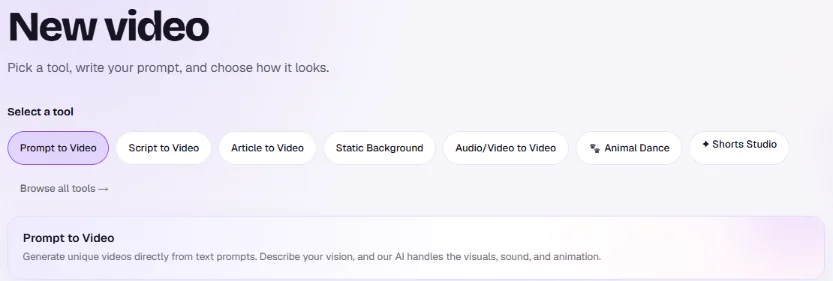
Swipe to see the whole picture →Step 1 — Open the creator: the page button opens New video with Prompt to Video picked; the Anime style and 30 seconds are set further down the page. - 02
Type a topic or paste a script
Reviral writes the plan and script for free, and you can edit every line.
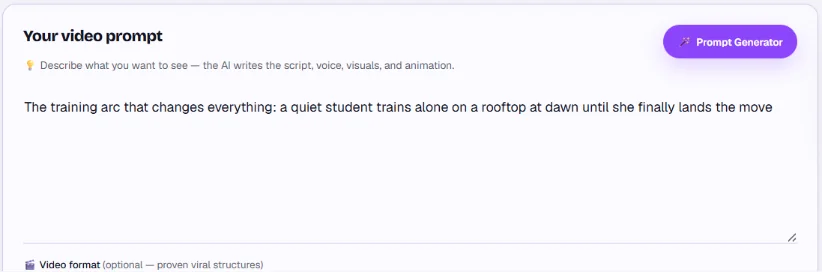
Swipe to see the whole picture →Step 2 — Type a topic or paste a script: the page's topic is already in Your video prompt; Prompt Generator writes one for you. - 03
Check the price and render
The price line shows the credits for your length before anything is charged.
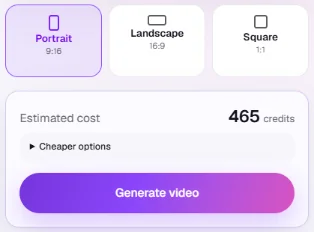
Step 3 — Check the price and render: a 30-second anime video in Portrait 9:16 shows Estimated cost 465 credits above Generate video. - 04
Download the video
Open the finished video and download the mp4.
Price shown before you render
How Much Does an AI Anime Video Cost?
A 15-second anime video costs 244 credits on Reviral, about $3.04 at the $4.99 Mini Pack rate, checked 24 September 2026. Length, resolution and media type change the price; the creator shows the exact charge before you render.
Anime videos on Reviral
Credits first, dollars at the $4.99 Mini Pack rate · checked 24 September 2026
| Video | Credits | Price |
|---|---|---|
| 15-second anime video, default Pro and Anime settings | 244 credits | $3.04 |
| 30-second anime video, same settings | 465 credits | $5.80 |
| One anime series episode | Shown in the Series planner before you render | |
| Sign-up bonus, no card | 100 free credits | Planning and scripts cost nothing |
| Mini Pack, one-time, never expires | 400 credits | $4.99 |
If a render cannot be finished, the credits are returned automatically. Monthly plans are optional, from $19. Prices checked 24 September 2026. Pay by card, or in ringgit (RM) with Touch 'n Go eWallet for credit packs or Visa/Mastercard for monthly plans.
Pick the mode that fits
Short Anime Video or Anime Series Episode?
Both modes use the same anime look. The series mode adds a planned episode and a character that never changes.
| What you get | Short anime video | Anime series episode |
|---|---|---|
| Where | Creator with the Anime style | Series studio, Anime Story format |
| Length | 15 to 300 seconds, or Auto (about 30 s) | A full multi-scene episode |
| Character | Descriptions and reference pictures reused across scenes | Face, hair and outfit locked across scenes and episodes |
| Voice | Voiceover in 30 script languages, 100+ voices | AI narrator voice |
| Captions and music | Animated captions, optional music | Captions and music included |
| Price | 244 credits for 15 s (about $3.04) | Shown in the Series planner before you render |
| Start | Open studio | Open studio |
Dollars at the $4.99 Mini Pack rate, checked 24 September 2026. Pay by card, or in ringgit (RM) with Touch 'n Go eWallet for credit packs or Visa/Mastercard for monthly plans.
Topics that work
Anime Video Ideas to Start With
"The training arc that changes everything" — a quiet student trains alone until she finally lands the move. Training arcs give the voiceover a clear before and after.
"Why the fastest runner in the academy never wins races" — a question hook makes people watch to the end for the answer.
"The 5 anime characters who would survive in real life" — a numbered list turns into one scene per character.
A script of your own — paste it instead of a topic, and the planner splits it into scenes. For long stories, use the Series studio so the main character stays the same from episode to episode.
Related pages
More Anime Styles and Ideas
Anime fighting video maker
Battles and rivalries, scene by scene, with the same fighter in every hit.
ARTHand-painted anime video
Soft watercolour shading for a cozy, storybook look.
EDITAnime edit ideas
Trending anime edit formats to copy.
?Best AI video model for anime
Which video model draws anime best, answered with prices.
Short answers
AI Anime Video Generator FAQ
Is there a free AI anime video generator?+
Reviral is free to start: sign-up gives 100 credits with no card, and writing the plan and script costs nothing. A finished 15-second anime video uses 244 credits (about $3.04 at the $4.99 Mini Pack rate).
How do I make an anime video with AI?+
Press the button, type a topic or paste a script, check the credit price, then render. Reviral writes the script, draws each scene in anime style, adds the voiceover, captions and optional music, and joins them into one mp4 in about 3 to 7 minutes.
How do I make an anime fighting video with AI?+
Type the fight as your topic, for example "two rivals clash on a burning rooftop", or open the anime fighting video maker for ready fight ideas.
How long can an AI anime video be?+
Short videos run 15 to 300 seconds, or Auto at about 30 seconds; the Series studio builds full multi-scene episodes.
Does the anime character stay the same in every scene?+
Yes. The series mode locks face, hair and outfit across every scene and every episode.
Can I turn my own script into an anime video?+
Yes. Paste the script and the planner splits it into scenes before you pay anything.
What languages can the anime voiceover speak?+
Any of 30 script languages, with more than 100 voices.
What do I get, and can it turn my own video into anime?+
You get an mp4: vertical 9:16 for TikTok, Reels and Shorts, or 16:9 and 1:1. It makes new anime scenes from your words and does not restyle a clip you filmed.
Plan free · price before you render
Make Your First Anime Video
The button opens the creator with the Anime style and 30 seconds picked and a starter topic filled in. A 30-second anime video costs 465 credits (about $5.80 at the $4.99 Mini Pack rate), checked 24 September 2026; the exact price shows before you render. Pay by card, or in ringgit (RM) with Touch 'n Go eWallet for credit packs or Visa/Mastercard for monthly plans.
Start with 100 free creditsLast updated: September 26, 2026